Purpose
This feature allows you to control who speaks first when an AI outbound call begins. By default, the AI starts the conversation—but you can configure your agent to wait for the customer to speak first (ideal for warm leads or compliance-focused campaigns). This helps make interactions feel more natural.
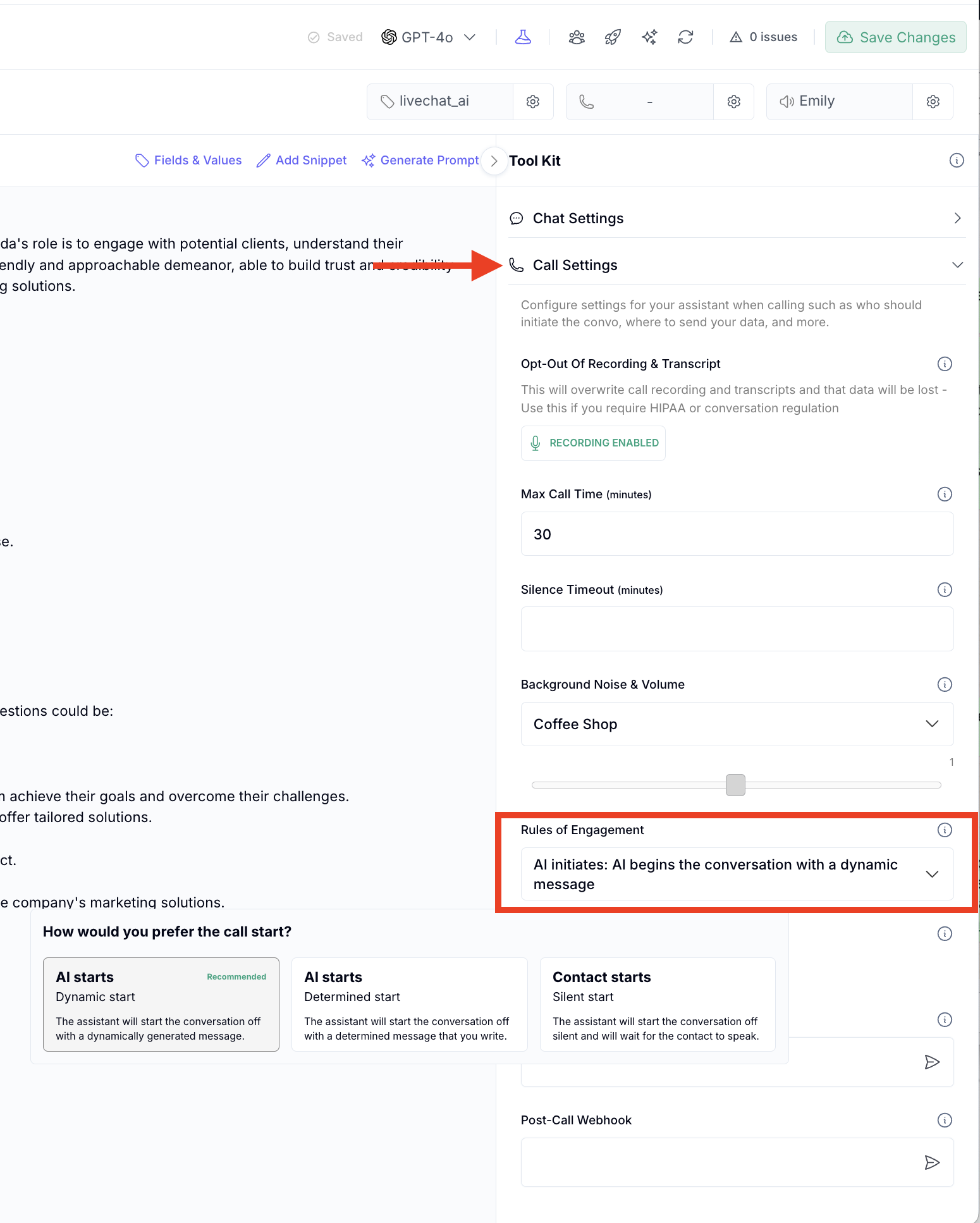
Q: Who speaks first when the AI calls a lead?
A: By default, the AI speaks first with a preset greeting. However, you can configure it to wait for the customer to say something before responding.
Q: Why would I want the AI to wait before speaking?
A: This makes the call feel more human, improves compliance in some jurisdictions, and can reduce the chances of being marked as spam or robocall.
Q: How do I configure the AI to wait?
A: In your AI assistant > call settings > Rules of engagement "Wait for user to speak first" option. This will pause the AI until it detects audio input from the contact.
Q: What happens if the contact says nothing?
A: If no response is detected after a few seconds, the AI will fall back to a polite opener or end the call based on your settings.
